


Local landing pages help customers find your business when they search for a service in a specific city or neighborhood. The best pages answer local questions, show proof that you work in the area, and make it easy to request a quote. This guide shows you how to build them without creating thin, copy-and-paste pages.
What are local landing pages?
Local landing pages are website pages built around a specific geographic market. A plumber might have a main plumbing service page and a separate page explaining plumbing services in a nearby city where the team regularly works.
Unlike a generic service page, a strong local page helps visitors decide whether you can serve their address, what problems you solve nearby, and how to contact you. It should feel useful even if the visitor never sees another page on your site.
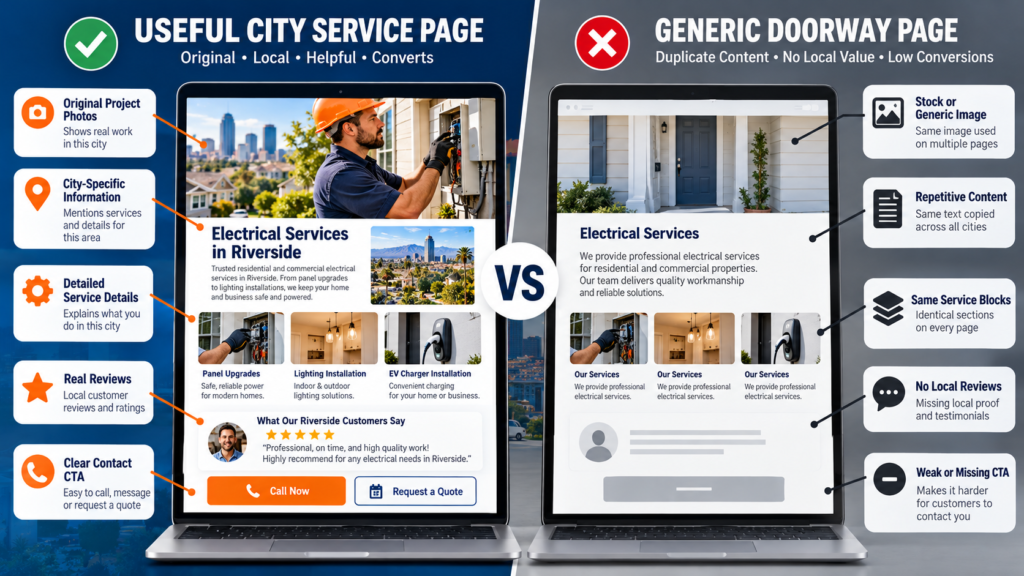
For example, “Water Heater Repair in Mesa” should explain common repair needs, response expectations, local project examples, and service coverage in Mesa. Simply replacing “Phoenix” with “Mesa” in a template does not create a valuable new resource.
Who needs service area pages?
These pages are especially useful for plumbers, electricians, HVAC companies, roofers, cleaners, landscapers, mobile mechanics, and other businesses that travel to customers. They can also support businesses with multiple real storefronts, but each location needs accurate, distinct details.
A service-area page on your website is not the same thing as a Google Business Profile location. You do not need to open another profile for every city you serve.
Do service area pages actually help SEO?
Yes, when they match real customer needs and contain useful, distinct information. They give search engines a clearer page to consider for a city-specific service query and give visitors more relevant answers.
But there is no guarantee of rankings. Results depend on competition, site quality, relevance, location, links, and many other signals. Publishing 50 city pages does not automatically make a company more visible.
Google explicitly warns about doorway abuse including substantially similar pages designed to capture many nearby searches and funnel visitors to one destination.
Your goal is not to create a page for every ZIP code. Your goal is to publish the best useful page for each market where you have real experience and something meaningful to say.
Service pages vs. city pages vs. location pages
| Page type | Main purpose | Example | Best use |
| Service page | Explain one service | /water-heater-repair/ | Broad service intent |
| City/service-area page | Serve a geographic market | /service-areas/mesa/ | Real coverage and local proof |
| Service + city page | Answer narrow local service need | /mesa/water-heater-repair/ | Only when distinct demand and content justify it |
| Physical location page | Describe a real staffed location | /locations/mesa/ | Real customer-facing office or branch |
Start with the simplest structure that serves your customers. One strong city page can be better than six weak service-city combinations that compete with each other.
Step 1: Choose cities based on real demand
Begin with places your crews actually serve, not a list of every city within a two-hour drive. Check job records, customer calls, travel time, service capacity, and the questions customers ask.
Then search phrases such as “AC repair in [city]” and “roof repair near [city].” Look at what people want: emergency help, price guidance, service availability, or proof of local experience.
Prioritize cities where you can deliver a good customer experience. A page that generates leads from an area you cannot reliably serve creates frustration and wasted time.
Build a practical priority score
Give each city a simple score from one to five for customer demand, past jobs, revenue potential, competition, and ability to serve quickly. This is a planning tool, not a Google ranking factor.
Start with two or three strong markets. Learn what works before expanding the website. Keep a spreadsheet of target cities, intended search terms, existing URLs, and the proof available for each page.
Step 2: Plan a clean website structure
Use short, readable URLs and group related pages logically. A contractor might organize its website around a main services section and a service-areas section.
Example: /services/plumbing/ for the service overview, /service-areas/ for the coverage hub, and /service-areas/mesa/ for the Mesa page.
Avoid making several pages that target almost the same query with almost the same content. When two pages have the same purpose, consider combining them rather than forcing both to exist.
Add a service-area hub that links to the cities you truly cover. Every city page should link back to the hub and to the relevant main service pages.
Step 3: Match each page to one clear search intent
Choose a primary service and geographic theme that reflect what people actually search for. The page title, heading, introduction, and body should all answer that same need.
A page titled “Emergency Plumbing in Mesa” should discuss urgent plumbing problems, what happens when someone calls, and where the team can respond. Do not fill it with unrelated roofing or landscaping content.
Use natural variations such as “Mesa plumbing repairs” where helpful. Do not repeat the city name in every sentence. Clear writing is more valuable than keyword stuffing.
Step 4: Add local proof that competitors cannot copy
This is the most important step. Local proof turns a generic page into evidence that your company actually works in the area. Collect it before you write.
- Describe a completed job in the city, with customer permission and no private details.
- Add original project photos with honest captions and descriptive alt text.
- Feature genuine reviews from customers in that area when you have permission to quote them.
- Mention relevant housing types, common service challenges, or seasonal conditions only when accurate.
- Explain response coverage and scheduling without promising unrealistic arrival times.
- Show licensing, insurance, or certifications only when current and verifiable.
A short, real example is stronger than a long paragraph of invented local history. If you do not have enough evidence for a separate page, strengthen your regional coverage page first.
Step 5: Write a page that answers customer questions
A useful local landing page should tell visitors what you offer, where you work, why they can trust you, and what to do next. Put the core answer near the top.
Recommended local landing page outline
- H1: [Service] in [City] — clear and specific.
- Opening: who you help, what you do, and how to request service.
- Services available: link to deeper service descriptions.
- Local proof: projects, photos, reviews, and real examples.
- Coverage details: neighborhoods or nearby areas you actually serve.
- Process: what happens after a customer calls or submits a form.
- FAQ: practical questions about timing, costs, service coverage, and preparation.
- CTA: one clear next step, with phone and accessible contact form.
For example, a page could explain that a licensed HVAC team serves Mesa homeowners, then show a recent installation and answer questions about scheduling. The details should come from real operations, not invented examples.
Step 6: Optimize titles, headings, and technical basics
Write a unique title tag and meta description for each page. Place the service and city naturally in the title and main heading, but keep the wording readable.
Use descriptive image names, compressed image files, mobile-friendly layouts, and fast-loading contact forms. Make sure the page is indexable and appears in your XML sitemap when appropriate.
Add internal links from the main service page, service-area hub, and relevant blog articles. Use descriptive anchor text such as “plumbing services in Mesa,” rather than repeating an exact keyword everywhere.
Follow Google’s SEO starter guide for crawlable links, clear content, and technical foundations. You can also review structured data guidance before adding supported markup.
Use accurate LocalBusiness structured data where appropriate, but do not invent addresses, ratings, or business locations. Schema is not a shortcut to ranking and does not guarantee a rich result.
Mid-article action: Check your local visibility
Before building more pages, use the free Localaized Rank Checker to review local search visibility. Then try the Free Local SEO Audit to identify broader website opportunities.
Step 7: Connect your pages to your Google Business Profile
Keep the service area on your Google Business Profile accurate. Google says service-area businesses generally use one profile for the whole area they serve, rather than creating a profile for every city.
The official service-area instructions explain how to select cities or postal codes and maintain accurate coverage. Adding cities to a profile does not guarantee stronger map rankings in those places.
Your website pages and Business Profile should tell a consistent story about services, coverage, and contact details. If you work from home and do not receive customers there, follow Google’s rules for hiding the address.
Do not invent storefronts, rent fake addresses, or build misleading location pages to make your company look bigger. Trust matters more than the appearance of geographic reach.
Step 8: Make the page easy to convert
Traffic is useful only if visitors can take action. Put a visible call or quote button near the top and repeat the next step after the proof section.
On mobile, test whether a visitor can tap the phone number, read the form, and understand service availability. Keep forms short and avoid asking for unnecessary personal information.
Offer helpful details such as normal booking windows, service limitations, or whether estimates are available. These answers can reduce unqualified calls and build confidence.
Genuine reviews can support that confidence. Use the free Review Link Generator to make it easier to ask real customers for feedback, without offering incentives for positive ratings.
Step 9: Publish, measure, and improve
After publication, submit your sitemap and inspect important URLs in Google Search Console. Indexing is not guaranteed, and it can take time for search performance to become clear.
Track impressions, clicks, queries, and landing-page visits. Also measure meaningful outcomes such as qualified calls, submitted forms, booked jobs, and revenue where possible.
Compare results by city over time, not just total site traffic. A page with fewer visits but better-fit customers may be more valuable than one with broad, irrelevant traffic.
Review pages every few months or when your coverage changes. Update project examples, availability, photos, and FAQs. Merge or remove weak pages when they no longer provide a distinct benefit.
Common mistakes that keep city pages from ranking
- Swapping only the city name while leaving every other paragraph identical.
- Publishing pages for places the business cannot actually serve.
- Using stock photos and made-up customer stories as local proof.
- Creating several overlapping pages with the same search intent.
- Hiding important service details below long, generic introductions.
- Forgetting internal links, mobile usability, and clear contact options.
- Treating a new service-area page as a new eligible Google Business Profile location.
These mistakes often share one cause: building pages for search engines instead of people. Start with the customer’s real decision and make each page useful enough to stand alone.
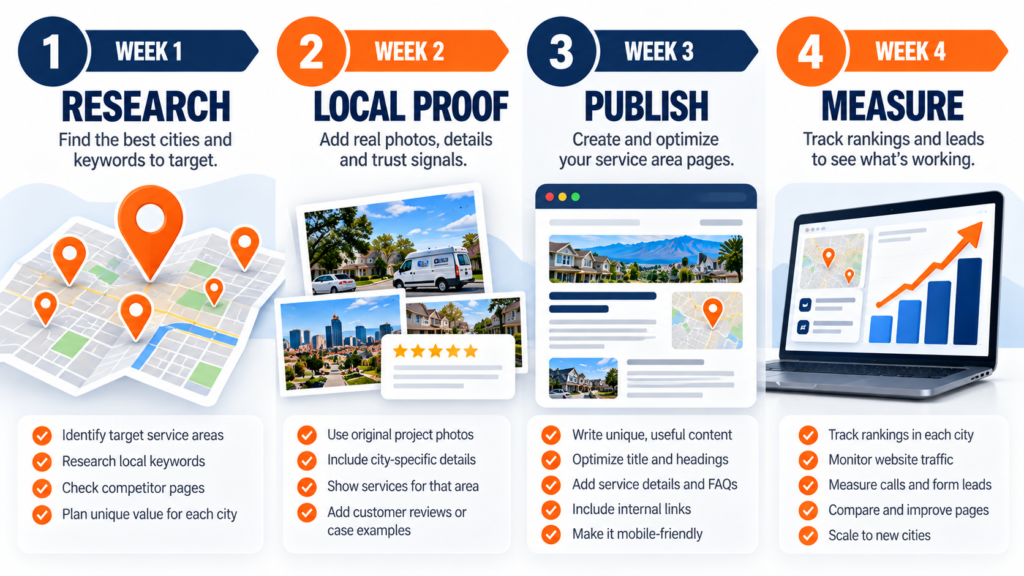
A simple 30-day service area page rollout
Week 1: Research and page mapping
Choose your first two or three markets, review search intent, and audit existing URLs. Decide which pages need to be created, improved, combined, or left alone.
Week 2: Gather proof and draft content
Collect real job details, approved photos, customer questions, and coverage information. Draft one page at a time with a distinct purpose and an obvious call to action.
Week 3: Publish and connect the site
Check title tags, headings, links, mobile display, contact forms, and indexing settings. Add each new page to the service-area hub and connect it to relevant service pages.
Week 4: Establish a measurement baseline
Record Search Console performance and lead data, then review the first signals without expecting instant results. Note what content customers use and what questions your sales team still hears.
Frequently asked questions about local landing pages
How many service area pages should a business create?
Create only as many as you can support with genuine, useful, distinct information. Start with a few priority markets and expand based on real service demand and evidence.
Can I use the same template for every city page?
Yes, a consistent design and section structure can improve usability. But the actual answers, examples, proof, and details should be meaningfully tailored to each city.
Do I need an office in each city to create a service area page?
No. A website can accurately describe areas where your team travels to serve customers. Do not claim a physical office or create extra Google Business Profiles where no eligible location exists.
Should I create one page for every city and service combination?
Not automatically. Make a separate combination page only when there is a distinct search need and enough unique information to justify it. Otherwise use a strong city page and linked service pages.
How long does it take for local landing pages to rank?
There is no fixed timeline. Search engines must discover and evaluate the page, and results depend on competition, site quality, and relevance. Monitor trends over weeks and months rather than promising a deadline.
What should I do if two city pages compete for the same searches?
Check whether they serve different user needs. Clarify the content and internal links, or consolidate them if the pages are effectively duplicates.
Build pages worth visiting
Strong local landing pages are not city-name placeholders. They are practical resources that show what your business does, where it truly works, and why a nearby customer should choose it.
Start small, show real proof, connect your pages clearly, and measure leads as well as rankings. That approach builds a more useful website and a stronger foundation for sustainable local visibility.
Find your next local SEO opportunity
Run the free Local SEO Audit to spot improvement opportunities, and use the Rank Checker to monitor visibility as you improve your local landing pages.