


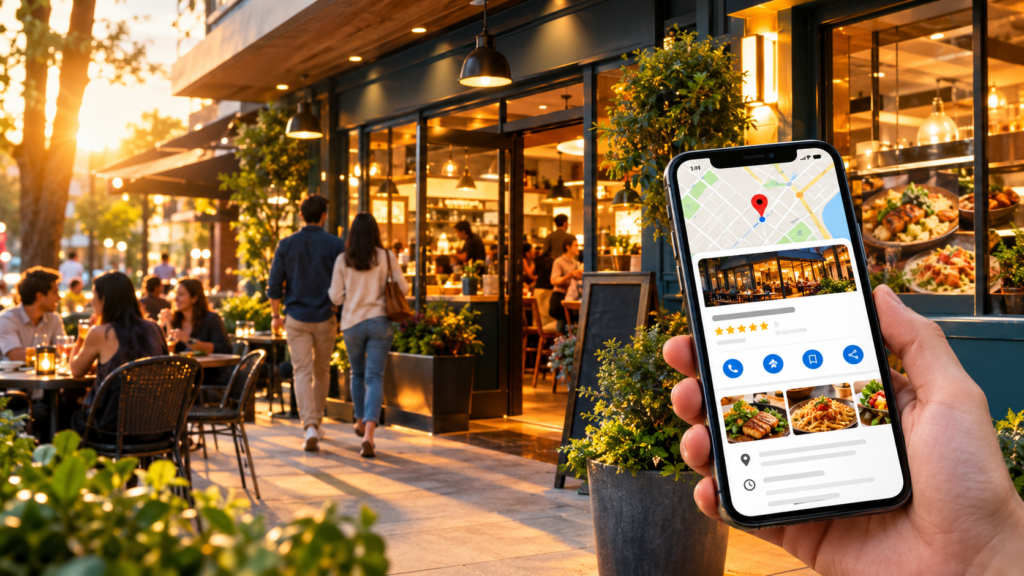
If someone searches “Italian restaurant near me,” “best tacos in [city],” or “restaurants open now,” local SEO for restaurants can help your business appear when that customer is deciding where to eat. For restaurants, Google Maps is more than a map: it can show your location, hours, menu, photos, reviews, booking or ordering options, and directions.
The good news is that you do not need a huge marketing budget to improve your local visibility. A complete Google Business Profile, accurate restaurant information, strong photos, a useful menu, genuine customer reviews, and a locally relevant website give Google clearer signals about what your restaurant offers and where you serve.
How Restaurant Local SEO Works
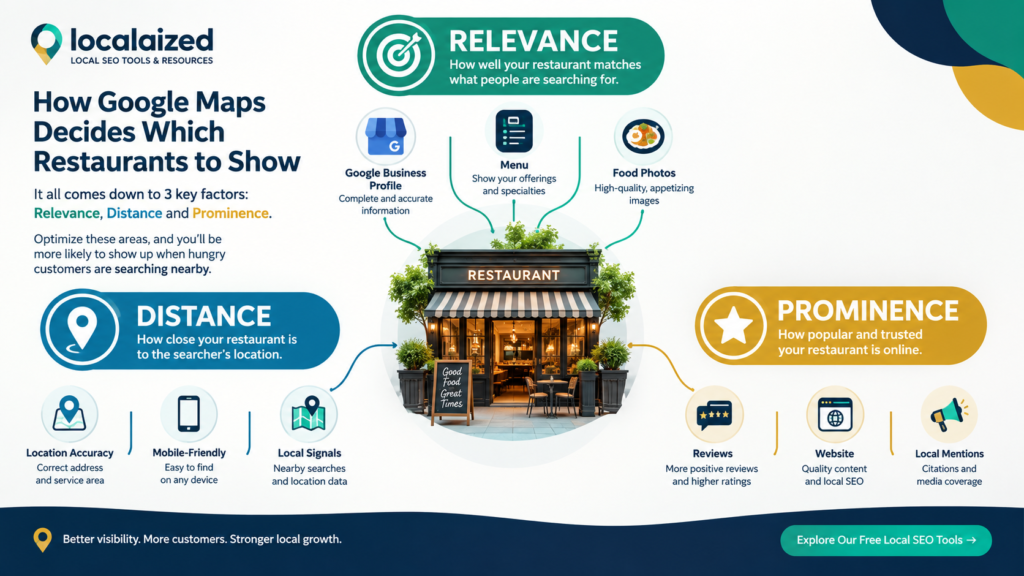
Restaurant local SEO is the process of improving your online presence so people nearby can discover, evaluate, and visit your restaurant. Google says local results are mainly influenced by relevance, distance, and prominence. Relevance is how well your profile matches the search, distance is how far the business is from the searcher, and prominence reflects how well-known the business is based on signals such as reviews and links. You cannot control a searcher’s location, but you can make your business information more complete, accurate, and useful.
Google’s official guidance on improving local ranking explains these three core factors and notes that businesses cannot pay Google for a better local ranking.
1. Claim and Verify Your Google Business Profile
Your Google Business Profile is the foundation of your restaurant’s Google Maps presence. If the profile is unclaimed, incomplete, or inaccurate, customers may see outdated information—or miss your restaurant entirely.
Start by making sure you have:
- A claimed and verified Google Business Profile
- Your real business name, exactly as used in the real world
- The correct physical address and phone number
- Accurate regular and holiday hours
- A relevant primary business category
- A working website and menu link
- Accurate attributes, such as outdoor seating or delivery, where applicable
Google’s restaurant-specific setup guide covers claiming and verification, business details, ordering, bookings, photos, menus, posts, reviews, and performance tracking. Read Google’s restaurant Business Profile guide
2. Choose the Most Accurate Primary Category
Your primary category tells Google what your restaurant is. Choose the most specific category that genuinely describes the business rather than selecting a broad category simply because it sounds popular.
For example, if the available category accurately describes the restaurant as a pizza restaurant, Italian restaurant, barbecue restaurant, or sushi restaurant, that specificity can help Google understand which searches are relevant. Do not add categories for cuisines or services you do not actually offer.
Google explains that business categories help connect businesses with customers searching for their products or services and can affect local ranking. See Google’s category guidance
3. Make Your Menu Easy to Find
For a restaurant, the menu is one of the most important pieces of decision-making information. A customer who finds your listing may immediately want to know what you serve, what it costs, and whether the menu matches their needs.
Add or maintain your menu directly in your Business Profile where available, and make sure the menu on your website is current. Use clear sections such as appetizers, mains, desserts, drinks, lunch, dinner, or children’s meals. Keep dish names, descriptions, and prices accurate.
Google says a detailed menu can help potential customers discover what a restaurant offers on Search and Maps. Learn about Google’s menu editor
4. Use Restaurant Photos That Help People Choose
People often decide where to eat visually. Your photos should answer practical questions: What does the food look like? What is the dining room like? Can I recognize the storefront? Does the restaurant feel right for a date night, family dinner, quick lunch, or special occasion?
Prioritize real photos of:
- Popular dishes and signature items
- The storefront and entrance
- The dining room and seating
- Outdoor seating or patio areas
- Drinks, desserts, and specialty items
- Your team or service experience
- Seasonal dishes or updated menu items
Google recommends category-specific food and drink photos and says photos should be in focus, well lit, and representative of reality. Review Google’s photo guidelines
5. Build a Consistent Review Routine
Reviews matter because they influence both customer trust and Google’s understanding of your business’s prominence. The goal is not to manufacture reviews or pressure customers into positive ratings. The goal is to make it easy for genuine customers to share honest feedback after a real dining experience.
A simple restaurant review process can look like this:
- Give customers a good experience worth talking about.
- Ask politely for honest feedback after the visit.
- Make the review process easy with a direct Google review link or QR code.
- Respond professionally to reviews, including criticism.
- Use recurring customer feedback to improve service, food, or operations.
Localaized’s Review Link Generator can create a simple review link you can share after a visit or place on a table card, receipt, or follow-up message.
| Make Reviews Easier If your restaurant already has happy customers but very few reviews, remove friction. Give customers one simple path to the review page instead of asking them to search for your restaurant themselves. → Create a Free Review Link |
6. Keep Your Restaurant’s Name, Address, and Phone Consistent
Your restaurant’s name, address, and phone number should match across your Google Business Profile, website, major directories, social profiles, and other trusted mentions. This is commonly called NAP consistency.
Consistency matters because Google gathers business information from multiple sources. If your old address remains on a directory while your current address appears on Google, customers may receive conflicting information and search engines have to reconcile it.
Google explains that local listing information can come from public web content, third-party data, users, business owners, and other sources. See how Google sources local business information
7. Create a Restaurant Website That Supports Your Maps Listing
Your Google Business Profile should not be treated as a replacement for your website. Your website gives Google and customers another reliable source of information about your restaurant.
Make sure your site clearly communicates:
- Restaurant name, address, phone, and hours
- Cuisine and major menu categories
- Current menu with prices where appropriate
- Reservations, ordering, delivery, or pickup options
- Parking or accessibility information
- Neighborhoods or areas you actually serve
- A clear contact or booking path
Use natural language rather than repeating the same phrase dozens of times. A page that says “best restaurant, best restaurant, best restaurant” is not useful to customers and is not a substitute for genuine local relevance.
8. Publish Useful Local Content
Restaurant content can extend beyond “we are open today.” Create pages or posts that answer the questions customers actually ask before visiting.
Examples include:
- Best dishes for a first-time visitor
- Where to eat before a local event
- Restaurant guide for a specific neighborhood
- Family-friendly dining information
- Date-night dining ideas
- Private dining or group booking information
- Seasonal menu guides
- Parking and accessibility tips
This content gives your website more opportunities to be relevant for local searches while helping customers make decisions. It can also support your visibility beyond traditional Google Maps results as search becomes more conversational.
9. Track Your Restaurant’s Google Maps Visibility
Do not rely only on searching your own restaurant name. Branded searches tell you that people already know you. Non-branded searches—such as “Thai restaurant near me,” “breakfast in [city],” or “pizza in [neighborhood]”—are more useful for understanding discovery.
Track a small group of realistic searches and record how your visibility changes over time. Rankings can vary by location, device, and search context, so avoid treating one manual Google search as the complete picture.
You can use the Localaized Rank Checker to check local ranking visibility for target searches.
Restaurant Local SEO: What to Fix First
| Area | What to check | Priority |
| Google Business Profile | Verified, accurate, complete, correct category | High |
| Menu | Current dishes, descriptions, prices, menu link | High |
| Reviews | Genuine review requests and thoughtful responses | High |
| Photos | Real food, interior, exterior, team, atmosphere | High |
| NAP consistency | Same business details across important sources | High |
| Website | Local relevance, menu, hours, contact/booking path | High |
| Local content | Useful pages answering customer questions | Medium |
| Rank tracking | Non-branded local searches monitored over time | Medium |
10. Don’t Ignore the Customer Experience After the Click
Getting found on Google Maps is only the first step. Once someone opens your profile, your photos, reviews, menu, hours, and website need to give them enough confidence to choose you.
Think of your Google Maps listing as a digital storefront. If the listing says you are open but your hours are wrong, the menu is outdated, photos are poor, or customers cannot figure out how to reserve a table, visibility alone will not solve the problem.
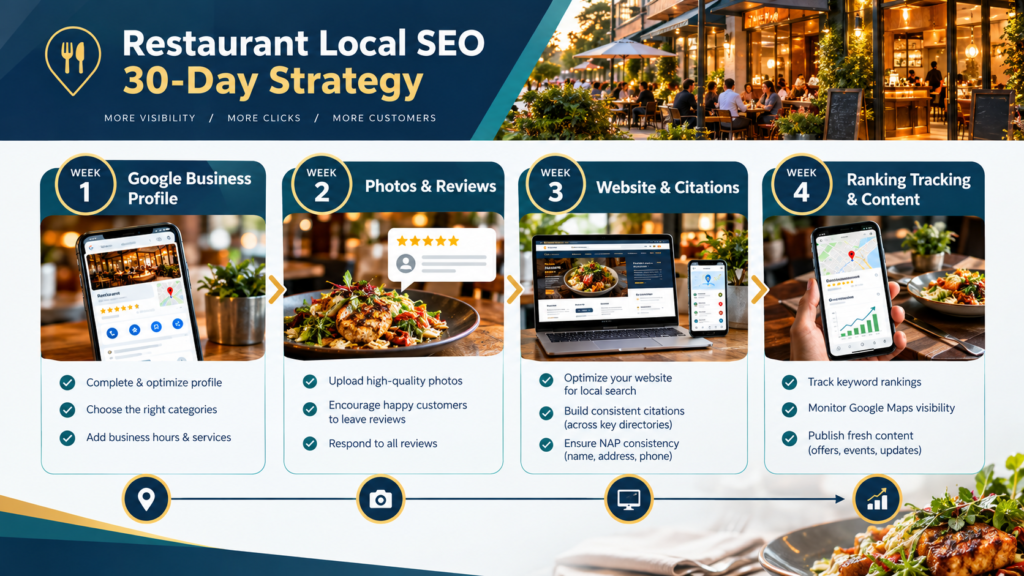
A Simple 30-Day Restaurant Local SEO Plan
- Week 1: Claim or verify your Google Business Profile and correct core information.
- Week 1: Confirm the primary category, hours, website, menu, ordering, and booking details.
- Week 2: Upload a useful set of real restaurant photos and replace outdated images.
- Week 2: Create a direct review link and build a simple, ethical review-request process.
- Week 3: Audit your restaurant’s name, address, and phone across major online listings.
- Week 3: Improve your website’s local information, menu, and conversion paths.
- Week 4: Choose 5–10 realistic non-branded searches and begin tracking local visibility.
- Week 4: Review what customers ask most often and turn those questions into website content.
Frequently Asked Questions
How do I get my restaurant to show up on Google Maps?
Start by claiming and verifying your Google Business Profile, then make the profile complete and accurate. Choose the right category, keep hours and menu information current, add useful photos, earn genuine reviews, maintain consistent business information across the web, and build a locally relevant website. Google says local results are primarily influenced by relevance, distance, and prominence.
How long does restaurant local SEO take?
There is no fixed timeline. Results depend on the restaurant’s location, competition, current profile quality, reputation, website strength, and other local signals. Track visibility over time instead of expecting a guaranteed ranking change on a specific date.
Do Google reviews help restaurants rank on Maps?
Reviews are one of the signals Google considers when assessing local prominence. More importantly, reviews help potential diners evaluate your restaurant. Focus on earning genuine feedback from real customers and responding professionally rather than trying to manipulate review volume or ratings.
Should my restaurant add keywords to its Google Business Profile name?
No. Use your real-world business name rather than adding phrases such as “Best Italian Restaurant in Miami” unless that is genuinely the business name used in the real world. Keyword stuffing a business name can violate Google’s guidelines.
How often should a restaurant add Google Business Profile photos?
There is no universal posting schedule that guarantees higher rankings. Add useful, current photos when your food, space, menu, team, or seasonal offerings change. Quality and accuracy matter more than uploading random images simply to create activity.
Can a restaurant rank in Google Maps if it has a small number of reviews?
Yes, a small review count does not automatically prevent a restaurant from appearing. Local ranking depends on multiple factors, including relevance, distance, and prominence. If your review count is low, focus on making the rest of your profile and customer experience as complete and useful as possible.
Make Your Restaurant Easier to Find
Restaurant local SEO is not about finding a secret trick that forces Google to rank you first. It is about making your restaurant easy for Google to understand and easy for customers to choose.
Start with the basics: an accurate Google Business Profile, a useful menu, strong real photos, genuine reviews, consistent business information, and a website that clearly explains what you offer and where you are. Then measure your visibility and improve one area at a time.
| Check Your Local VisibilityWant to know where your restaurant stands before you start making changes? Localaized offers free local SEO tools built for small businesses and SEO professionals. → Run a Free Local SEO Audit → Check Your Google Maps Rankings → Create a Free Review Link |