

Your Google Business Profile shows up on page one. It sits in the map pack for the exact searches that should bring in work. By every ranking metric, it’s winning — but the phone still isn’t ringing the way it should.
Google Maps traffic not converting into real customers is one of the most common, and most misunderstood, problems in local search. It’s confusing precisely because everything looks like it’s working: the visibility is there, the views are there, and yet the revenue isn’t following.
The reason is simple once you see it. Ranking well on Google Maps only wins the first step of a four-step race. “Get found” is where most local SEO advice stops, but three more steps stand between a search result and a signed customer — and any one of them can quietly leak the traffic you worked hard to earn.
This guide breaks down exactly where that traffic disappears, why it happens, and which fixes actually move the needle first.
The Traffic Trap: Why Views Don’t Equal Revenue
Google Business Profile Insights can show a business owner hundreds of monthly views, dozens of direction requests, and a healthy map ranking. On paper, none of that looks like a problem. In practice, none of it pays a single bill.
A view is not a phone call. A phone call is not a booked job. Somewhere between “found on Google Maps” and “money in the bank,” most local businesses lose the majority of their traffic and never find out exactly where.
Picture a plumber ranking #1 for “emergency plumber near me” in their city. Search volume is strong, the profile gets dozens of weekly views, and direction requests keep climbing. Calls, though, stayed flat for three straight months. The ranking wasn’t the problem — three-year-old reviews and a message button nobody was answering were.
Local SEO agencies, including Localaized, talk a lot about rankings because rankings are measurable and visible on a report. Conversion is messier and harder to track, so it usually gets ignored until an owner asks the obvious question: “If we’re ranking #1, why aren’t we busier?”
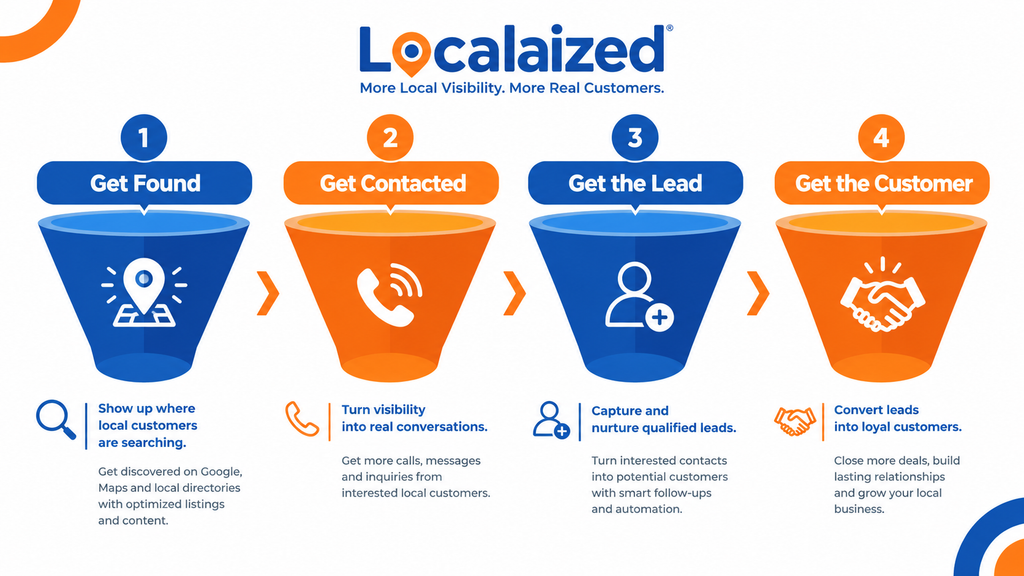
The 4-Stage Local Search Funnel You’re Probably Only Half Optimizing
Every customer who finds a local business on Google moves through four stages, and each one can quietly fail on its own, independent of how well the profile ranks.
- Get Found — the business appears in the Maps 3-pack or organic local results.
- Get Contacted — a searcher taps “Call,” “Message,” or “Directions.”
- Get the Lead — that contact turns into an actual conversation about the job.
- Get the Customer — the lead books, pays, and, ideally, leaves a review.
| Funnel Stage | What Has to Happen | What Usually Breaks It |
|---|---|---|
| Get Found | Business appears in the Maps 3-pack or local organic results. | Weak profile completeness, inconsistent NAP, thin service content. |
| Get Contacted | Searcher taps call, message, or website link. | No clear CTA, broken phone number or link, messaging disabled. |
| Get the Lead | The contact becomes a real inquiry. | Slow response time, generic replies, no after-hours coverage. |
| Get the Customer | The lead books and pays. | Weak or outdated reviews, unclear pricing signals, no follow-up. |
Most local SEO effort — including a lot of what gets sold as “SEO services” — stops at the first stage. That’s exactly why traffic keeps climbing while revenue stays flat.
5 Reasons Your Google Maps Traffic Isn’t Converting
1. Your Profile Answers “What,” Not “Why You”
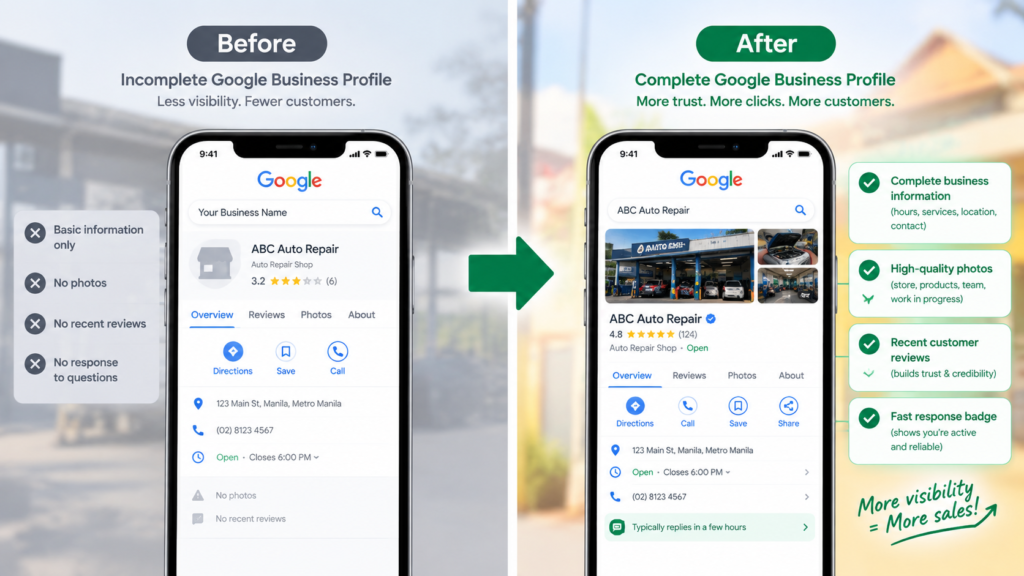
A Google Business Profile that only lists a category, a service area, and business hours tells a searcher what the business does. It does nothing to explain why they should pick this business over the three others sitting on the same map.
Searchers comparing multiple listings side by side make snap judgments based on completeness, specificity, and trust signals. A generic profile blends into the pack; a specific one stands out enough to earn the tap.
Quick Fix
Add real service descriptions instead of relying on category tags alone. Fill in the Q&A section proactively rather than waiting for questions to appear. Post to Google Business Profile weekly to show current activity — see our guide to Google Business Profile posts for a full walkthrough.
2. Your Reviews Are Old, Thin, or Never Answered
97% of consumers read reviews before choosing a local business, and a large and growing share won’t consider a business with fewer than 20 reviews or an average under 4.5 stars, according to BrightLocal’s annual Local Consumer Review Survey. A five-star rating built up in 2023 doesn’t carry the weight it once did if nothing new has been added since.
Unanswered reviews, positive or negative, send a quieter signal: this business isn’t paying attention. That hesitation shows up right before someone would have picked up the phone to call.
Quick Fix
Ask for reviews consistently, right after the job wraps up, using a link the customer can tap in one step. Our free Review Link Generator builds that link in seconds, so there’s no fumbling through Google’s dashboard mid-conversation. Reply to every review within a few days, good or bad.
| 💡Fix Your Review Gap TodayNot sure how your review profile actually looks to a searcher? Generate a one-tap Review Link Generator link free and start closing the recency gap this week. |
3. Your Contact Options Are Missing or Broken
A caller who hits a disconnected number, a slow-loading website, or a “Message” button that goes nowhere doesn’t wait around to figure out the problem. They tap the next listing down.
Google Business Profile messaging, when enabled, does get used — but only helps conversion if someone is actually on the other end to answer it.
Quick Fix
Test every contact point on the profile personally, once a month: phone number, website link, message button, and booking link if one exists. If messaging sits unanswered for hours at a time, an AI receptionist can hold that line open around the clock — see how that works in our breakdown of AI receptionists for local businesses.
4. Your Photos Don’t Look Like Real Work
Stock photos, blurry job-site snapshots, or a profile running on five-year-old images all send the same signal: this business isn’t active. Searchers use photos as a trust check before they ever get to a review.
Profiles with fresh, real photos of actual jobs, vehicles, and teams consistently earn more direction requests and calls than profiles coasting on default or outdated images.
Quick Fix
Upload new photos monthly, favoring real completed jobs over posed marketing shots. For a full breakdown of what to shoot and how often, see our guide to GBP photo optimization.
5. Nobody Answers Fast Enough
Search Engine Journal points to a 24-hour response time as the baseline for Google Business Profile messaging performance, with faster response meaningfully improving outcomes, not just optics. (See: Search Engine Journal’s GBP optimization guide.) A searcher who reaches out to three businesses at once almost always books with whichever one answers first.
Speed is one of the biggest conversion levers on this entire list, and it’s the easiest one to fix without touching the profile itself at all.
Quick Fix
Set a same-hour response standard for calls and messages during business hours, and route after-hours contacts somewhere real — a receptionist, a voicemail with a callback promise, or an automated first reply — rather than letting them sit silent until morning.
| Find Every Leak in Your FunnelWant the full picture of where your profile is leaking traffic before it ever reaches your phone? Run a Free Local SEO Audit and see exactly which of the five leaks above applies to your business. |
Tools to Track the Whole Funnel, Not Just Rankings
Rank tracking alone can’t tell a business owner why traffic isn’t converting — it can only confirm the traffic exists. Our free Rank Checker shows exactly where a profile stands in local results, which covers step one of the funnel.
Pairing that with a completed Free Local SEO Audit shows what’s happening at every stage after that: contact points, review health, and response gaps included. For a closer look at tracking rankings specifically, see our guide to checking local SEO rankings.
If Local Services Ads are also part of the mix, it’s worth understanding how that traffic behaves differently from organic Maps traffic — our Local Services Ads vs. Google Maps Organic comparison covers the difference.
Frequently Asked Questions
Why is my Google Maps ranking good but I’m not getting calls?
Ranking well only guarantees visibility, not action. If the profile lacks clear contact options, recent reviews, or real photos, searchers see the listing but choose a competitor instead of reaching out.
How many Google reviews does a business need to convert well?
There’s no fixed number, but recent consumer research shows a large share of searchers hesitate below 20 reviews or a 4.5-star average. Both volume and recency matter more than hitting one specific total.
Does response time actually affect Google Maps conversions?
Yes. Searchers frequently contact more than one business at once, and the first business to respond usually wins the job, regardless of who ranks higher on the map that day.
Should I focus on SEO or on fixing my contact and review setup first?
If a profile already ranks and gets traffic, fixing contact points, response speed, and reviews usually produces faster revenue results than chasing additional ranking gains.
Can an AI receptionist help with Google Maps conversion specifically?
It can, mainly by closing the response-time gap — answering calls and messages instantly during and after business hours so leads don’t drift to a faster-responding competitor. See our AI receptionist guide for how that fits into a Google Maps strategy.
Fix the Leak, Not Just the Rank
Google Maps traffic that isn’t converting almost always comes down to one or two fixable leaks, not a ranking problem. The five reasons above cover the majority of them, and none require a full SEO overhaul to address.
Ready to Find Out Where Your Customers Are Disappearing?
Start with a Free Local SEO Audit to see exactly where your profile is losing customers, then use the Rank Checker and Review Link Generator to close the gaps you find.
Written by
Bryan Eric Tidalgo
5-year Local SEO Specialist helping US small businesses rank on Google Maps. Founder of LocalAIzed.com