

GBP photo optimization means adding clear, useful, and regularly updated images to your Google Business Profile so customers can trust your business before they call, click, or visit. Photos may not work like a simple “upload image, rank higher” button, but they can improve engagement, relevance, and customer confidence.
If your profile has old, blurry, missing, or generic photos, you may be giving searchers a reason to choose a competitor. In local search, small trust signals matter. A clean storefront photo, real team photo, service image, or product shot can make your listing feel active and legitimate.
For local business owners, GBP photos are one of the easiest improvements to make. You do not need a professional studio. You need a simple photo plan, a few quality standards, and a habit of adding fresh images over time.
This guide explains why Google Business Profile photos matter, what types of photos to upload, how to optimize them, and how to connect your photo strategy to stronger local SEO results. If you want to measure visibility after updates, use the free Localaized Rank Checker to monitor your Google Maps positions.
Do GBP Photos Affect Google Maps Ranking?
Yes, GBP photos can affect Google Maps performance indirectly by improving engagement, trust, and profile completeness. Google does not say that photos alone guarantee higher rankings, but photos can help users interact with your listing, and user engagement supports local visibility.
Google explains that local results are based mainly on relevance, distance, and prominence in its official local ranking documentation. Photos can support relevance by showing what your business offers. They can support prominence by helping your profile look active, trusted, and worth engaging with.
Think of photos as conversion and trust assets. They help searchers decide if your business matches what they need. When more people view your photos, click for directions, call your business, or visit your website, your profile sends stronger quality signals.
| Ranking factor area | How photos help | Example |
| Relevance | Photos show services, products, locations, and real business context. | A med spa uploads treatment room and facial service photos. |
| Prominence | Fresh, high-quality photos make a listing look active and trustworthy. | A roofer adds before-and-after project photos monthly. |
| Engagement | Better photos can increase clicks, calls, direction requests, and profile views. | A restaurant adds menu, interior, and food photos. |
| Conversion | Photos reduce uncertainty before a customer contacts you. | A dentist shows the office, team, parking, and exam rooms. |
Photos are not a replacement for reviews, categories, citations, website SEO, or proximity. They work best as part of a complete Google Business Profile strategy. For the larger foundation, link readers to Google Business Profile Optimization.
Why GBP Photos Matter for Local Customers
GBP photos matter because customers use them to decide whether your business feels real, current, and trustworthy. Before calling, many people look at your storefront, team, products, vehicles, menu, or completed work.
A profile with strong photos answers questions quickly. Is this place open? Is it clean? Do they do the service I need? Can I picture myself visiting or hiring them?
That matters because local search is often high intent. Someone searching “emergency plumber near me,” “Botox near me,” or “family dentist in town” is not casually browsing. They are comparing options fast.
| Weak GBP photo profile | Strong GBP photo profile |
| No recent uploads | New photos added every month |
| Only a logo or stock image | Real business, team, service, and product images |
| Dark, blurry, or cropped images | Bright, clear, properly framed images |
| No location or parking photos | Exterior, entrance, parking, and interior photos |
| Random customer photos dominate | Owner-uploaded photos guide the first impression |
What Types of Photos Should You Add to Google Business Profile?
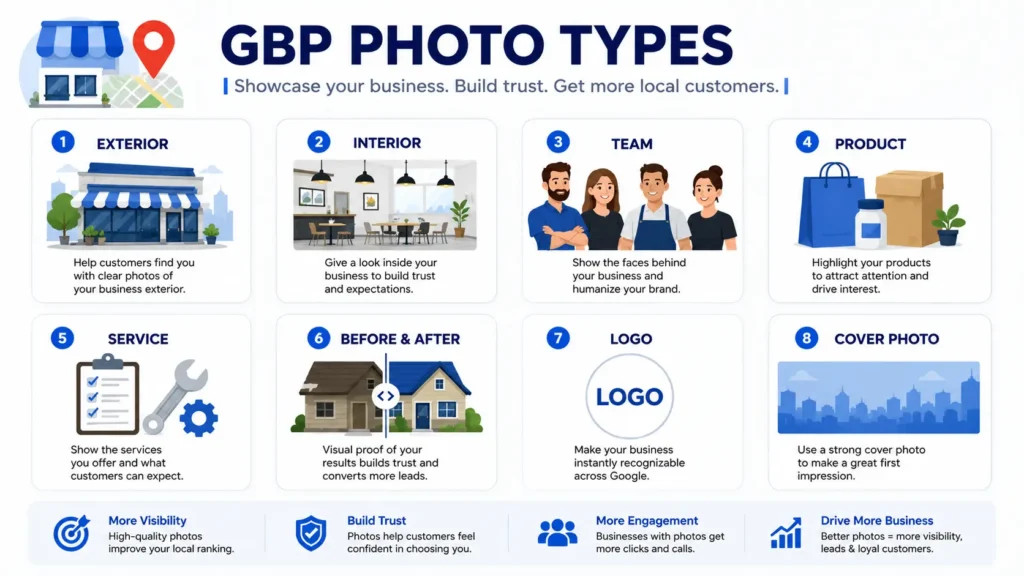
The best GBP photo mix includes exterior photos, interior photos, team photos, product or service photos, before-and-after images when appropriate, and brand assets. Each photo type helps answer a different customer question.
Exterior Photos
Exterior photos help customers recognize your location before they arrive. Upload images of your storefront, building sign, entrance, parking area, and nearby landmarks if helpful. Take them during daylight so signage is readable.
Interior Photos
Interior photos show the experience customers can expect. They are especially useful for restaurants, clinics, salons, gyms, retail stores, offices, and service businesses with showrooms.
Team Photos
Team photos make your business feel human. They are useful for trust-heavy industries like legal, dental, medical, home services, financial services, and real estate.
Product and Service Photos
Product and service photos help Google and customers understand what your business offers. Upload images of top services, best-selling products, equipment, completed jobs, and customer-facing results.
Before-and-After Photos
Before-and-after photos are powerful when they are honest, compliant, and relevant. They work well for contractors, landscapers, remodelers, cleaners, salons, med spas, fitness studios, and cosmetic providers.
Logo and Cover Photo
Your logo helps brand recognition, while your cover photo can guide the first impression. Google may choose which photos appear most prominently, but you should still upload a clean logo and a strong cover image.
GBP Photo Optimization Best Practices
To optimize GBP photos, use clear images, upload the right photo types, add fresh photos consistently, avoid stock images, and make sure every image reflects your real business. The goal is to help customers understand and trust you faster.
Use real photos, not stock images
Stock images do not prove that your business is real. Google and customers both prefer authentic photos that show your actual location, team, products, or work.
Keep photos bright and easy to understand
Use natural lighting when possible. Avoid dark rooms, heavy filters, awkward angles, and cluttered backgrounds.
Upload photos consistently
A profile with recent photos looks more active. Add new images monthly, or more often if you have frequent projects, events, products, or seasonal changes.
Show your main services visually
If a service is important to your revenue, make sure it is represented in your photo library. Do not expect customers to guess what you do.
Use descriptive filenames before uploading
Google may not rely heavily on filenames, but organized filenames help your team manage assets. Use names like dental-office-waiting-room.webp or roof-replacement-before-after.webp.
Avoid text-heavy graphics
Photos should be photos. Avoid turning GBP into a flyer board. Google Business Profile posts are better for promotions and announcements.
Follow Google photo rules
Do not upload offensive, misleading, low-quality, or irrelevant content. Review Google’s policies and profile content guidance before posting sensitive material.
For official upload and profile guidance, review Google Business Profile Help and the Google Business Profile photo and video guidelines.
Check Whether Your Photo Updates Improve Visibility
Updating your GBP photos is only useful if you also track what happens next. After you refresh your photo library, check whether your Google Maps visibility improves with the free Localaized Rank Checker. If you want a broader view of profile issues, run a Free Local SEO Audit.
How Often Should You Add New GBP Photos?
Most local businesses should add new GBP photos at least once per month. Businesses with frequent projects, menu changes, inventory changes, events, or seasonal services should upload photos weekly or biweekly.
Consistency matters more than a one-time photo dump. Uploading 50 photos once and then ignoring your profile for a year is not ideal. A steady schedule keeps your listing fresh.
- Monthly: add 3–5 new photos of services, products, team, or location.
- Quarterly: refresh exterior, interior, and seasonal photos.
- After major projects: upload approved before-and-after or finished-work images.
- After branding changes: update logo, signage, uniforms, vehicles, and office visuals.
- Before busy seasons: add photos that match seasonal demand.
GBP Photo Ideas by Business Type
The right photo strategy depends on what your customers need to trust before they buy. A restaurant needs food and atmosphere photos. A plumber needs service proof, vehicles, and team trust. A clinic needs clean facilities and professional staff.
| Business type | Photo ideas | Why it helps |
| Restaurant | Menu items, dining area, exterior, staff, seasonal specials | Shows food quality and atmosphere before a visit |
| Dentist | Waiting room, treatment rooms, team, technology, exterior | Reduces anxiety and builds trust |
| Roofing contractor | Before-and-after roofs, crews, trucks, materials, safety setup | Proves real project experience |
| Med spa | Treatment rooms, devices, staff, reception, approved result photos | Builds comfort and professionalism |
| Law firm | Office, attorneys, conference room, signage, team photos | Creates credibility before a consultation |
| Retail store | Displays, products, entrance, checkout area, seasonal inventory | Helps shoppers know what to expect |
If you serve a specific vertical, connect your photo plan to industry search behavior. Related Localaized guides include Local SEO for Dentists, Local SEO for HVAC Companies, and Local SEO for Lawyers.
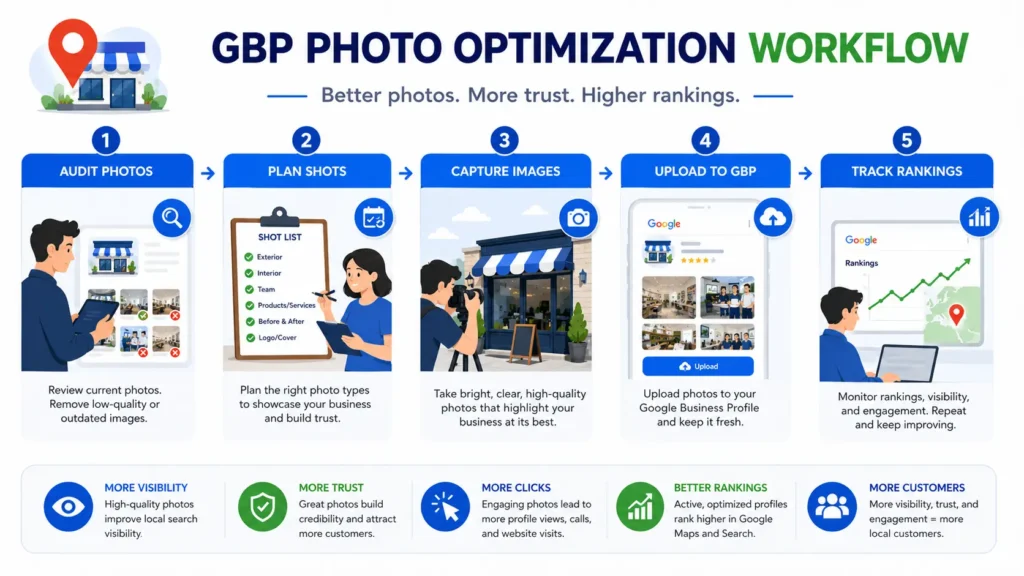
How to Optimize GBP Photos Step by Step
To optimize GBP photos, audit your current images, remove poor impressions when possible, plan your core photo categories, upload high-quality real images, and track visibility changes over time. Use this process as a repeatable monthly workflow.
Step 1: Audit your current GBP photos
Open your Google Business Profile and review what customers see first. Look for outdated images, blurry photos, irrelevant user uploads, missing storefront photos, and gaps in your service visuals.
Step 2: Build a core photo list
Create a checklist of must-have images: logo, cover photo, exterior, interior, team, services, products, vehicles, and completed work.
Step 3: Take photos with search intent in mind
Ask what a customer needs to see before choosing you. If customers worry about parking, show parking. If they want proof of quality, show finished work.
Step 4: Prepare files before uploading
Use clear filenames, crop images properly, and choose clean horizontal or square photos when possible. Avoid tiny, stretched, or heavily filtered images.
Step 5: Upload photos to the right sections
Add images through your Business Profile dashboard. Place logo, cover, interior, exterior, team, product, and service images where they make the most sense.
Step 6: Repeat every month
Set a recurring reminder to upload new photos. A simple monthly habit can keep your listing fresh without overwhelming your team.
Step 7: Measure results
Track calls, direction requests, website visits, profile views, and keyword rankings. Use the Localaized Rank Checker to monitor Google Maps movement after updates.
Common GBP Photo Mistakes to Avoid
The biggest GBP photo mistakes are using stock images, ignoring old photos, uploading low-quality images, failing to show your services, and letting customer-uploaded photos define your brand. These issues can weaken trust quickly.
- Using only a logo and no real business photos.
- Uploading photos once and never updating them.
- Posting graphics that look like ads instead of real photos.
- Using images from another location for a multi-location business.
- Showing messy, dark, or unprofessional work areas.
- Forgetting to update photos after renovations, rebrands, or new signage.
- Ignoring customer photos that create a poor first impression.
This is also where reviews and photos work together. A great photo may earn attention, but strong reviews help close the trust gap. If you need an easier way to ask customers for reviews, use the free Review Link Generator to create a direct Google review link.
How GBP Photos Fit Into a Complete Local SEO Strategy
GBP photos are one part of local SEO, not the whole system. To rank higher on Google Maps, you also need accurate business information, strong categories, reviews, local content, citations, and a useful website.
Photos help your profile convert attention into action. But if your name, address, and phone number are inconsistent, your categories are wrong, or your reviews are weak, photos alone will not fix the problem.
- A fully optimized Google Business Profile.
- Consistent NAP information across directories.
- A steady review generation process.
- Local landing pages or service pages on your website.
- High-quality photos and posts that keep your GBP active.
- Regular tracking for Maps rankings and visibility changes.
For related reading, link this article to How to Rank Higher on Google Maps, What Is NAP Consistency?, and How to Use Google Business Profile Posts.
FAQ: GBP Photo Optimization
Do photos help my Google Business Profile rank higher?
Photos can help your Google Business Profile perform better by improving engagement, trust, and profile completeness. They are not a standalone ranking shortcut, but they support the signals that help customers choose and interact with your business.
How many photos should I upload to my Google Business Profile?
Start with at least 10–20 strong photos that cover your exterior, interior, team, services, products, and brand. After that, add 3–5 new photos each month to keep your profile fresh.
Should I use professional photos for GBP?
Professional photos can help, but they are not required. Clear, bright, real photos taken with a modern phone are often enough. Authenticity matters more than perfection.
Can I delete bad customer photos from my Google Business Profile?
You usually cannot remove customer photos just because you dislike them. However, you can report photos that violate Google policies. You should also upload better owner photos so your best images define the profile.
What photo size is best for Google Business Profile?
Use high-quality images that are clear, properly framed, and not overly compressed. Google’s guidance may change, so check its official Business Profile photo guidelines before building a formal image spec.
How often should I update GBP photos?
Most businesses should update GBP photos monthly. High-activity businesses, seasonal businesses, restaurants, contractors, and retailers may benefit from weekly or biweekly uploads.
Turn Photo Updates Into Measurable Local SEO Progress
Your GBP photos should do more than make your listing look nice. They should help customers understand your business, trust your team, and take the next step.
Start by updating your most important photos this week. Then measure your visibility with the free Rank Checker, create a direct review link with the Review Link Generator, or run a Free Local SEO Audit to find your next ranking opportunities.
Written by
Bryan Eric Tidalgo
5-year Local SEO Specialist helping US small businesses rank on Google Maps. Founder of LocalAIzed.com