

Local SEO for electricians is the fastest way to get your phone ringing with real jobs. When a homeowner searches “electrician near me,” Google shows a map with three businesses first. If you are not one of them, those calls go to someone else.
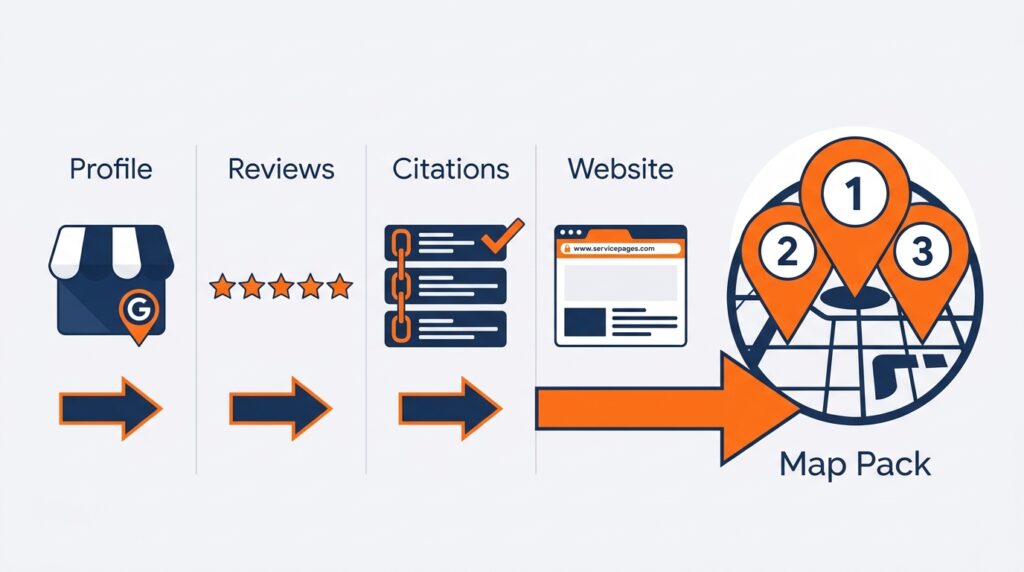
The good news is that you do not need a big budget to compete. You need a strong Google Business Profile, steady reviews, clean business listings, and a website that matches what you do. This guide walks you through each step in plain language, so you can start winning more Google Maps calls this month.
What Is Local SEO for Electricians?
Local SEO for electricians is the process of making your electrical business show up in Google Maps and local search results when people nearby need help. It focuses on your Google Business Profile, reviews, local listings, and location-based website pages. The goal is simple: more calls from people who are ready to hire.
Local SEO is different from regular SEO. Regular SEO tries to rank a page for anyone, anywhere. Local SEO ranks you for people near your service area, which is exactly who hires electricians.
Why Google Maps Matters So Much for Electrical Contractors
Google Maps matters because electrical problems are urgent and local. A homeowner with a dead outlet or a tripping breaker will not scroll through ten pages of results. They tap one of the top three businesses in the map pack and call.
Here is why the map pack is such a big deal for electricians:
- It sits above the regular website results on most local searches.
- It shows your phone number, reviews, and a call button right on the screen.
- Most of these searches happen on a phone, so one tap can turn into a booked job.
- The searcher is usually ready to hire, not just browsing.
If you have read our guides on local SEO for plumbers and local SEO for HVAC companies, you will notice the same pattern. Home service customers choose fast, and the map pack gets the first look. Electricians play by the same rules.
Step 1: Claim and Fully Optimize Your Google Business Profile
Your Google Business Profile (GBP) is the biggest lever for ranking in Google Maps. To optimize it, claim and verify your listing, choose the right categories, and fill out every section completely. Google rewards profiles that are complete, accurate, and active.
For a deeper walkthrough, see our full guide to Google Business Profile optimization. Google also explains how it picks local results in its guide to improving your local ranking.
Choose the Right Categories
Your primary category is one of the strongest signals you send Google. For most electricians, “Electrician” is the right primary choice. Add secondary categories only if they truly match services you offer, such as electrical installation or EV charger installation, when they appear in your category list.
Avoid stuffing in categories you do not offer. It confuses Google and can hurt your rankings.
Add Your Services, Description, and Hours
List every electrical service you offer. Think panel upgrades, outlet repair, rewiring, lighting installation, EV charger installation, generator hookups, and emergency repair. Use plain wording that customers would actually type into Google.
Then write a business description that explains who you are, where you work, and what you do best. Mention your license and years in business if you can. For tips on writing for both people and AI search, read our guide on how to write a GBP description.
Upload Real Photos and Post Updates
Photos build trust fast. Upload pictures of your team, your truck, finished jobs, and clean panel work, and skip the stock images. Our guide to GBP photo optimization shows what to upload and how often.
Also share updates regularly. Google Business Profile posts let you promote offers, recent projects, and safety tips right on your listing.
Step 2: Set Up Your Service Area the Right Way
Most electricians drive to customers, so your service area matters more than a storefront. A service area is the list of cities or zip codes you serve, and you set it inside your GBP. List only the places you truly work.
Here is how to set it up well:
- If customers do not visit your location, hide your street address and use the service area setting.
- Add the cities you actually serve, not your whole state.
- Keep your service area consistent with your website and listings.
- Never use a fake address or virtual office to look closer to customers.
Follow Google’s guidelines for representing your business to avoid suspensions. Also remember that Google ranks you mostly by how close you are to the searcher. You may rank higher near your base and lower farther away, which is normal and is why the next steps matter.
Step 3: Get More Google Reviews (and Reply to Every One)
Reviews help you rank and help you win the click. Google looks at how many reviews you have, how recent they are, and what customers say. Shoppers care too, and the BrightLocal Local Consumer Review Survey tracks how heavily people lean on reviews when choosing a local business.
Here is a simple review routine:
- Ask right after a job is finished, while the customer is happy.
- Send a direct review link by text so leaving a review takes one tap.
- Let customers write in their own words. They often mention the job naturally, like a panel upgrade or ceiling fan install.
- Reply to every review, good or bad, within a day or two.
The easiest way to make this happen is our free Review Link Generator. It creates a direct Google review link you can text or email in seconds. For more ideas, read how to get more Google reviews for your small business.
| Get Your Review Link in 30 SecondsReviews are the fastest way to separate yourself from other electricians in the map pack. Create your direct Google review link for free, then see what else is holding your profile back. | |
| Open the Review Link Generator | Run a Free Local SEO Audit |
Step 4: Build Citations and Keep Your NAP Consistent
Citations are mentions of your business name, address, and phone number (NAP) on other websites. Think Yelp, Angi, Facebook, and your local chamber of commerce. When these details match everywhere, Google trusts your business more.
Mixed details send mixed signals. An old phone number or a slightly different business name can quietly hold your rankings back. Learn the full story in our post on NAP consistency, and use our list of local business directories to find places worth listing.
If cleanup sounds like a time sink, our citation building service can handle it for you. Moz also has a helpful local SEO learning center if you want to go deeper.
Step 5: Build a Website That Supports Your Maps Ranking
Your website backs up your Google Business Profile. When your site clearly shows what you do and where you do it, Google is more confident showing you in the map pack. A simple, fast site beats a fancy one that confuses visitors.
Create One Page for Each Core Service
Make a separate page for each major service, such as panel upgrades, EV charger installation, and whole-home rewiring. Each page should explain the service, show your process, and include a clear call button. Avoid cramming everything onto one page.
Add Location Pages for Your Top Cities
If you serve several towns, build a helpful page for each one. Mention real neighborhoods, local projects, and common issues, like older homes with outdated wiring. Do not copy the same text and swap the city name, because Google can spot thin duplicate pages.
Use Schema Markup
Schema markup is code that helps search engines understand your business. The Electrician type on Schema.org lets you mark up your name, services, hours, and service area. Many SEO plugins can add it for you.
Step 6: Target the Keywords Electrician Customers Actually Search
Customers search in a few predictable ways. Match your content to each type so you show up at every stage of the decision.
| Search Type | Example Searches | Where to Use Them |
|---|---|---|
| Emergency | emergency electrician near me, 24 hour electrician | GBP description, homepage, 24/7 service page |
| Service-based | panel upgrade, EV charger installation | Service pages and GBP services list |
| Location-based | electrician in [your city] | City pages and title tags |
| Problem-based | outlet not working, breaker keeps tripping | Blog posts and FAQ sections |
| Commercial | commercial electrical contractor [your city] | Dedicated commercial services page |
Start with the searches closest to a booked job, like emergency and service-based terms. Then add blog content to catch people earlier in their research.
Organic Google Maps vs. Local Services Ads: Which Should Electricians Use?
Many electricians use both. Local Services Ads are paid, pay-per-lead spots at the top of the page, while organic Maps rankings are free but take time to build. Here is a quick comparison:
| Factor | Organic Google Maps | Local Services Ads |
|---|---|---|
| Cost | Free, aside from your time or an agency fee | You pay for each lead |
| Speed | Weeks to months | Can start sooner after approval |
| Long-term value | Builds over time and keeps working | Stops when you stop paying |
| Main requirements | Strong GBP, reviews, and citations | Google screening, licensing checks, and a lead budget |
Our full breakdown is in Local Services Ads vs. Google Maps organic. For most electricians, strong organic rankings make each lead cheaper over the long run.
How to Track Your Electrician Rankings on Google Maps
You cannot improve what you do not measure. Rankings change from block to block, so a search from your shop looks different than a search across town. Use a local rank tracker to see where you really appear.
Try our free Rank Checker to see how you show up for searches like “electrician near me.” Check monthly and write down changes. Our local rank checking guide explains how to read the results.
Want a full picture of what to fix first? Run our Free Local SEO Audit and follow it alongside our local SEO audit checklist.
Common Local SEO Mistakes Electricians Make
Most electricians lose ground because of small, fixable problems. Watch out for these:
- Adding extra keywords to your business name, which can get your profile suspended.
- Ignoring reviews or never replying to them.
- Letting phone numbers and addresses differ across listings.
- Creating duplicate or fake profiles.
- Skipping dedicated service pages on your website.
- Missing calls that come in after hours or while you are on a job.
That last mistake costs more than most owners realize. If your rankings bring in calls at night, every missed call is a lost job. An AI receptionist like TalkLocal can answer and capture leads around the clock. Read more in our post on how an AI receptionist helps local businesses capture more leads.
Your 30-Day Local SEO Action Plan for Electricians
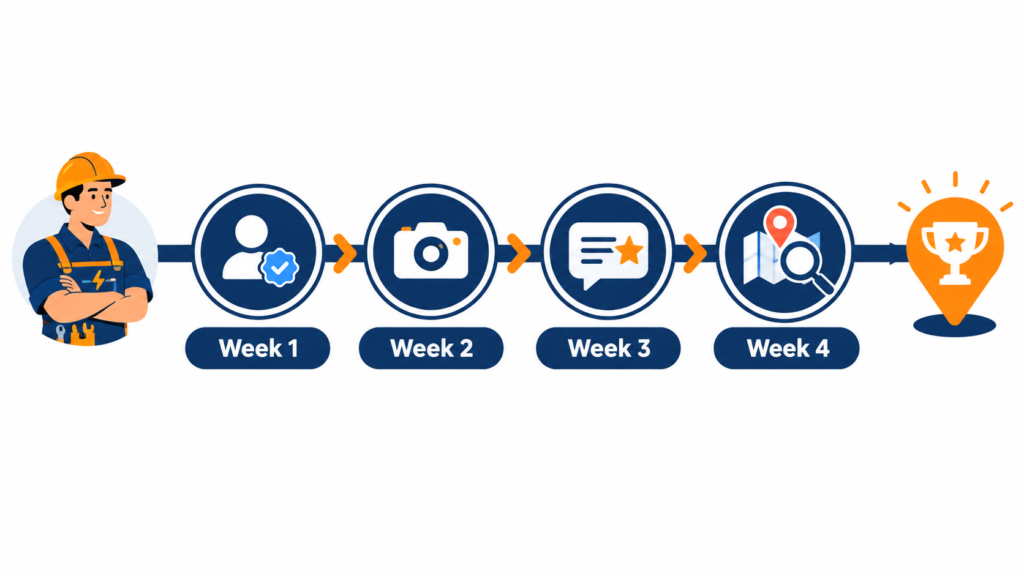
You do not need to do everything at once. Follow this simple plan to build momentum:
- Week 1: Claim and verify your GBP, choose your categories, and list every service.
- Week 2: Add real photos, set your service area, and fix any inconsistent listings.
- Week 3: Start your review routine with a direct link and reply to every existing review.
- Week 4: Publish one service page or city page, add schema, and check your rankings.
After 30 days, repeat the review routine every week and add one new page or post each month. Steady effort beats a big push that fades.
Frequently Asked Questions About Local SEO for Electricians
How do electricians rank on Google Maps?
Electricians rank on Google Maps by fully optimizing their Google Business Profile, earning steady reviews, keeping listings consistent, and building a website with clear service and location pages. Distance from the searcher also matters, but a strong, active profile can rank across a wider area.
How long does local SEO take to work for an electrician?
Many electricians see early movement within a few weeks, but stronger Maps rankings usually take three to six months. Results depend on your competition, review count, and how complete your profile is.
How much does local SEO cost for electricians?
Costs vary widely. Doing it yourself costs mostly time, while agencies usually charge a monthly fee. See our breakdown of how much local SEO costs to compare options.
Do I need a physical office to rank on Google Maps?
No. Service-area businesses can hide their address and still rank, as long as they follow Google’s guidelines. Never use a fake address or a virtual office, because that can get your profile suspended.
How many reviews does an electrician need?
There is no magic number. Aim to have more recent, high-quality reviews than the top three businesses in your area, and keep adding new ones every month.
Start Winning More Electrician Calls from Google Maps
Local SEO for electricians comes down to a few things done well and done consistently: a complete Google Business Profile, strong reviews, consistent listings, and a helpful website. Start with your profile and your review routine, then work down the list.
If you want expert hands on this, explore our local SEO services or contact our team.
| Ready to Get More Calls from Google Maps?See where your electrical business stands today. Run a free audit, check your Maps rankings, and set up your review link, all free from Localaized. | ||
| Free Local SEO Audit | Check My Rankings | Get My Review Link |
Written by
Bryan Eric Tidalgo
5-year Local SEO Specialist helping US small businesses rank on Google Maps. Founder of LocalAIzed.com